Hyrrokkin User Guide
Hyrrokkin is a python-based framework which manages the execution of computational graphs, termed topologies.
The framework provides the following:
- Topology API - a Python API for constructing and running topologies.
- Package API - Python and Javascript APIs for implementing packages of nodes that can be linked together to form topologies
- Topology CLI - a command line tool for running topologies.
- Topology UI tools - web-based tools for building and interacting with topologies:
- A
directory tool, listing which topologies are stored, and allowing a user to open them in a designer or application. - A
designer tool, allowing a user to modify and run topologies. - An
application tool, allowing a user to interact with a running topology via selected pages, whilst hiding the topology structure.
- A
- Topology Application API - a JSON based API for defining applications
Installing Hyrrokkin
Hyrrokkin is open source software released under the MIT License and is installable as a Python package. For installation instructions and to view the source code, see https://codeberg.org/visual-topology/hyrrokkin.
Introduction - Basic Concepts
Topologies
Each topology consists of executable components called nodes, connected by links.
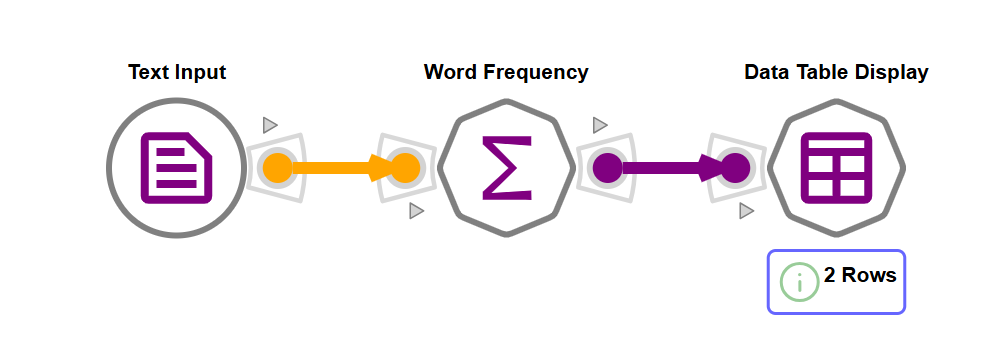
The simple topology pictured above contains 3 nodes and 2 links. Data flows from left to right through the links connecting the nodes.
Topologies are executed using an engine. Two engines are provided, currently:
Python Engine
This engine supports nodes written in python.
Javascript Engine
This engine supports nodes written in Javascript. It can be used if deno (https://deno.com/) is installed or to run topologies within web-browsers.
Nodes, Ports and Links
Nodes communicate with each other via input and output ports.
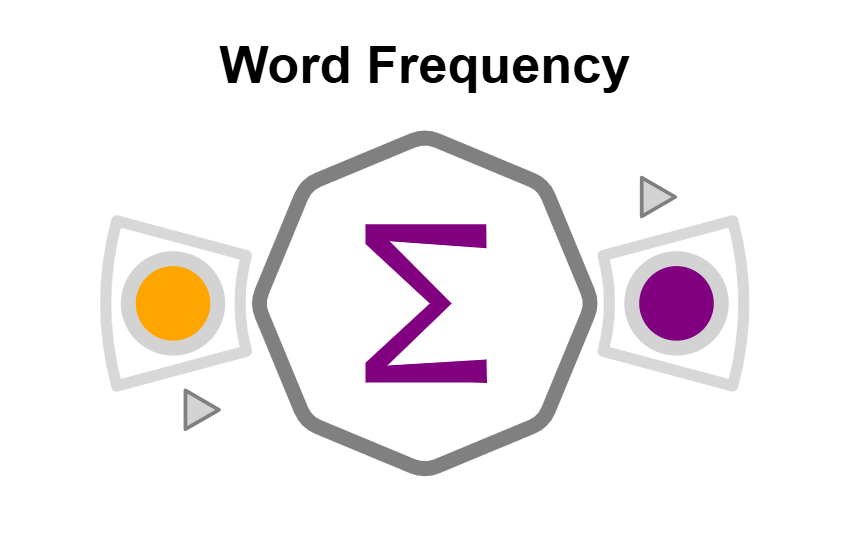
Nodes are associated with a python or javascript class which implements the node's behaviour according to the hyrrokkin package API.
Most notably, the node's class will implement a run method which transforms a set of values received through that node's input ports into a set of values sent out via the node's output ports.
A topology will also contain links, which connect the output port of one node to the input port of another.
Both ports and links are associated with a particular link type, and link types are assigned different colours. For the "Word Frequency" node, the input port accept text values and the output port produces frequency_table values.
Packages and Package Configurations
Node types and link types are bundled together into a package containing related functionality.
A package must also define a configuration class, a single instance of which will be created when a topology is loaded into an engine for execution.
Configuration instances can be accessed by any node or any other configuration instance. They must also define a factory method called create_node which will be called to create instances of nodes which belong to the package.
Persistent storage
As well as persisting the structure of a topology, Hyrrokkin manages the persistent storage of key-value pairs for each node and configuration within a topology.
There are two types of persistent storage:
- properties - key-value pairs where the values are JSON-serialisable
- data - key-value pairs where the values are binary data
Clients
Clients may be attached to specific nodes and configurations and interact with them by exchanging messages. Messages consist of one or more parts, each part may be binary, text or any JSON-serialisable value.
An Example Package - textgraph
Consider a very simple example package, textgraph. Textgraph implements some simple code for calculating the frequencies of words within text documents.
The textgraph package consists of a configuration class and five node classes:

- TextgraphConfiguration
The configuration class is responsible for creating instances of the nodes defined in this package.
- InputTextNode
Stores input text and outputs this value via its output port
data_out. Clients can send a new value to this node to trigger re-execution of downstream parts of the topology.
- MergeTextNode
Merge multiple text documents output from InputTextNode nodes into one output text document.
- WordFrequencyNode
Expects text input values via its input port
data_in, computes the frequencies of each word in the text and outputs this information in table form via output portdata_out.
- MergeFrequenciesNode
Merges two frequency tables, either by adding or subtracting the frequencies of each word.
- DisplayTableNode
Receives a tabular via its input port
data_in, and communicates those to any attached clients.
Package API: Implementing Hyrrokkin packages
Packages bundle together a set of nodes with related functionality and include:
- a schema file ("schema.json")
- code defining a package configuration class
- node and link types defined in the schema
- code defining classes to implement each node
- html pages referenced in the schema that can be used to interact with nodes or the configuration
- [optional] localisation bundles to localise html pages and messages
- [optional] templates defining some example topologies which use the package
- [optional] define web applications based on topologies
For more details on how to define a package, see:
Defining Packages using the Package API
Topology API: Creating, loading and running Hyrrokkin topologies from python
Hyrrokkin provides a Python API for creating, running and loading and saving topologies.
For example, lets create and run a simple topology using the textgraph package.
from tempfile import TemporaryDirectory

from hyrrokkin.api import Topology

# provide the resource path to the hyrrokkin package containing the schema.json file
textgraph_package = "hyrrokkin.example_packages.textgraph"

with TemporaryDirectory() as tmpdir:
    t = Topology(topology_folder=tmpdir,package_list=[textgraph_package])

    # create a text processing topology to analyse word frequencies with 3 nodes and 2 links

    t.add_node("n0", "textgraph:text_input_node", data={"value":b"This is some simple text"})
    t.add_node("n1", "textgraph:word_frequency_node", properties={"threshold":1})
    t.add_node("n2", "textgraph:table_display_node")

    t.add_link("l0", "n0", "data_out", "n1", "data_in")
    t.add_link("l1", "n1", "data_out", "n2", "data_in")

    # intercept output from the word frequency node and print it
    t.add_output_listener("n1","data_out", lambda v:print(v))
    assert(t.run() == {}) # run the topology and wait for all nodes to complete, check no errors were returned
Running this program prints the following output
b'{"simple": 1, "text": 1}'
For more details, see Topology API
Topology CLI - loading, saving and running topologies from the command line
The Hyrrokkin package will install a hyrrokkin CLI command. Some typical usages include:
Import a topology from zip and run it:
hyrrokkin --packages hyrrokkin_example_packages.textgraph \
                --execution-folder /tmp/execution_test \
                --import-path topology.zip --run
Import a topology from yaml, run it and save the topology (including data) to a zip file:
hyrrokkin --packages hyrrokkin_example_packages.textgraph \
                --execution-folder /tmp/execution_test \
                --import-path topology.yaml \
                --run --export-path topology.zip
Convert a topology from zip format to yaml format, but do not run it:
hyrrokkin --packages hyrrokkin_example_packages.textgraph \
                --execution-folder /tmp/execution_test \
                --import-path topology.zip \
                --export-path topology.yaml
Topology UI tools - designing and running topologies in a web interface
Within the hyrrokkin repo, the ui sub-project defines a web interface allowing topologies to be designed and run from a browser.
This designer can be used in different configurations
- Opened on a topology running in a conventional backend service (using the
hyrrokkin.apps.designertool). - Run entirely within a web-browser ("hyrrokkin-lite")
Hyrrokkin Directory,Designer,Application - browse, design and interact with hyrrokkin topologies in a web-browser
- The directory tool allows you to work with a set of topologies, and open topologies in the designer tool or as applications
Launch the directory tool using the command hyrrokkin_directory
$ hyrrokin_directory --topologies-folder my_topologies
http://localhost:9002/topology-directory.html
- The designer tool is a standalone tool for interacting with a single topology using the designer user interface
Launch the designer tool using the command hyrrokkin_designer
hyrrokin_desginer --topology-path my_topologies/topology1
http://localhost:9002/topology-designer.html
Both of these tools are configured using an options.toml file which specifies which hyrrokkin packages should be loaded.
The following options file is loaded, unless specified on the command line using --options-path
# configuration file for hyrrokkin designer/directory apps

# specify import paths for additional topology package to load
# to include the textgraph example package
include_packages = ["hyrrokkin.example_packages.textgraph"]

# specify patterns to select topology packages to exclude
exclude_packages = []

[designer_options]

title = "Hyrrokkin Designer"
splash_text = "Hyrrokkin Designer - Loading..."
splash_image = "hyrrokkin.svg"

[directory_options]

title = "Hyrrokkin Directory"
splash_text = "Hyrrokkin Directory - Loading..."
splash_image = "hyrrokkin.svg"

# declare any topology templates, located as python resources
[templates.example]
package = "hyrrokkin.example_packages.textgraph.topologies"
resource="example.zip"

# declare any applications, to display in the directory
[applications.abc]
label="Test Application Description"
package="hyrrokkin.example_packages.textgraph.applications"
resource="example.json"
Notebook Integration
Launch the designer user interface from a Jupyter or Colab notebook. The interface opens within a cell in the notebook.
Jupyter notebooks must be running on a JupyterHub server with jupyter server proxy installed.
from hyrrokkin.api.topology import Topology
from hyrrokkin.notebook_adapter.designer_adapter import DesignerAdapter

t = Topology("topologies/mytopology")
da = DesignerAdapter(t)
da.open_designer(window_height=800)
Launching the directory user interface is also possible within notebook cells:
from hyrrokkin.api.topology_directory import TopologyDirectory
from hyrrokkin.notebook_adapter.direcrory_adapter import DirectoryAdapter

td = TopologyDirectory("topologies")
da = DirectoryAdapter(td)
da.open(window_height=800)
For more details see Notebook Integration
Hyrrokkin Lite - run Hyrrokkin Directory, Designer and Applications entirely within browsers
Deploy hyrrokkin lite using the distribution in the ui/dist folder.
ui/
    dist/
        hyrrokkin-lite-directory.html     ...open this page for the directory web-app
        hyrrokkin-lite-designer.html      ...open this page for the designer web-app
        hyrrokkin-lite-application.html   ...this page is used to load applications - web-apps based on topologies
        hyrrokkin-ui/                     ...hyrrokkin client-side code and dependencies - source code - js and css files
        example-packages/                 ...any example packages
        options.json                      ...hyrrokkin lite's configuration file
        serve.py                          ...a convenience python script to serve hyrrokkin-lite
The options.json file is used to configure hyrrokkin-lite, and is loaded by the designer, directory and application tools.
{
    "canvas_height": 2000,
    "canvas_width": 4000,
    "designer_title": "Topology Designer",
    "directory_title": "Topology Directory",
    "package_urls": ["example-packages/textgraph"],
    "workspace_id": "hyrrokkin_textgraph",
    "templates": {
        "example": {
            "url": "example-packages/textgraph/topologies/example.zip"
        }
    },
    "directory_url": "hyrrokkin-lite-directory.html",
    "designer_url": "hyrrokkin-lite-designer.html",
    "application_url": "hyrrokkin-lite-application.html",
    "icon_url": "hyrrokkin-ui/images/hyrrokkin-ui.svg",
    "designer_splash": {
        "title": "Hyrrokkin Lite Topology Designer",
        "image_url": "hyrrokkin-ui/images/hyrrokkin-ui.svg"
    },
    "directory_splash": {
        "title": "Hyrrokkin Lite Topology Directory",
        "image_url": "hyrrokkin-ui/images/hyrrokkin-ui.svg"
    },
    "applications": {
        "application_demo": {
            "url": "example-packages/textgraph/applications/example.json",
            "label": "A simple application based on textgraph"
        }
    }
}
| option | description | example |
|---|---|---|
| canvas_height | set the height of the canvas upon which nodes are placed (the designer app shows a window on this canvas) | 2000 |
| canvas_width | set the width of the canvas upon which nodes are placed | 4000 |
| designer_title | text that is displayed as a title in the designer application | "Topology Designer" |
| directory_title | text that is displayed as a title in the directory application | "Topology Directory" |
| package_urls | A list of URLs which point to folders containing Hyrrokkin packages (each folder should contain a schema.json) | ["example-packages/textgraph"] |
| workspace_id | a unique string identifying a workspace - a separate area in which topologies are stored in the browser's IndexedDB | "my_workspace" |
| templates | specify one or more zip files containing pre-packaged topologies | { "demo": { "url": "topologies/abc.zip" } } |
| designer_splash | configure the splash screen displayed when starting the designer app with title text and an image | { "title": "Topology Designer", "image_url": "hyrrokkin-ui/images/hyrrokkin-ui.svg" } |
| directory_splash | configure the splash screen displayed when starting the directory app with title text and an image | { "title": "Topology Directory", "image_url": "hyrrokkin-ui/images/hyrrokkin-ui.svg" } |
| applications | register a set of applications, this will be linked to in the directory app | { "application_demo": { "url": "example-packages/textgraph/applications/example", "label": "a demo app"} } |
| min_window_width | recommend a minimum window width in the designer UI. Set to zero to disable a minimumn. Defaults to 800. | 1024 |
| min_window_height | recommend a minimum window height in the designer UI. Set to zero to disable a minimumn. Defaults to 600. | 768 |
| directory_url | the name of the directory HTML file. | "hyrrokkin-directory.html" |
| designer_url | the name of the designer HTML file. | "hyrrokkin-designer.html" |
| application_url | the name of the application HTML file. | "hyrrokkin-designer.html" |
| icon_url | url of an icon to display in the user interface | "hyrrokkin-ui/images/hyrrokkin-ui.svg" |
| debug_l10n | surround localised text with *, useful for finding non-localised text | true |
Topology Application API
This API defines a web application based on a specific topology. The API consists of a JSON document that maps node or configuration client pages onto a grid that is displayed in a web page. The document can define multiple layouts which are selected based on the window width.
For more details see Hyrrokkin Application API